Given the following: List<List<Option>> optionLists
What would be a quick way to find the subset of Option objects that appear in all N lists?
Equality is determined through some string property such as option1.Value == option2.Value.
We should end up with List<Option> where each item appears only once.
Answear:
var x = from list in optionLists
from option in list
where optionLists.All(l => l.Any(o => o.Value == option.Value))
orderby option.Value
select option;
Pokazywanie postów oznaczonych etykietą Tips. Pokaż wszystkie posty
Pokazywanie postów oznaczonych etykietą Tips. Pokaż wszystkie posty
sobota, 12 listopada 2016

sobota, 29 października 2016
LINQ - Convert List to Dictionary with Value as List
I have a List<MyObject> that I retrieve from the database.
I would like it keyed by a property in MyObject for grouping purposes.
What is the best way with LINQ to cast my list to: Dictionary<long, List<MyObject>>
Answear:
List<MyObject> list = ...;
var map = list
.GroupBy(x => x.KeyedProperty)
.ToDictionary(x => x.Key, x => x.ToList());
wtorek, 8 grudnia 2015
Visual Studio 2012 recent projects not updated in taskbar
I have Visual Studio pinned to the taskbar. When clicking on the icon with the mouse right button, a list of recent projects and solutions in shown.
This used to work OK, but from some time now, the list is not being updated. I always see same projects and solutions under Recent, although I have worked with newer projects lately.

This used to work OK, but from some time now, the list is not being updated. I always see same projects and solutions under Recent, although I have worked with newer projects lately.

How to fix it:
- Remove the solution from the visual studio recent list
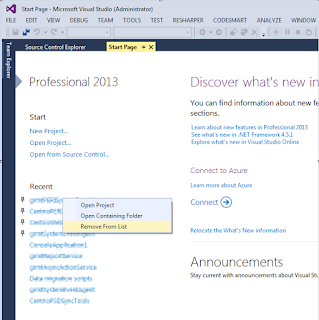
- Close all VS instance
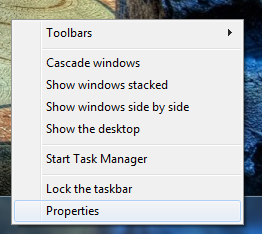
- Right click on the Taskbar and click Properties
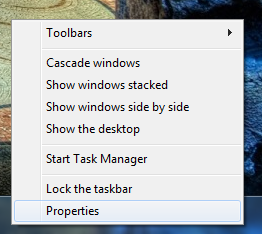
- Go to tab Start Menu
- Uncheck both "Store and display recently opened items ..."

- Click Apply/Ok
- Wait a moment
- Click again Taskbar -> Properties
- Check "Store and display recently opened items ..."
- Wait a moment
- Open your VS solution and it should now appear in task bar in Recent


czwartek, 19 listopada 2015
Search sql server database for string by sys.sql_modules
sys.sql_modules
Returns a row for each object that is an SQL language-defined module. Objects of type P, RF, V, TR, FN, IF, TF, and R have an associated SQL module. Stand-alone defaults, objects of type D, also have an SQL module definition in this view.
Object TYPE:
https://msdn.microsoft.com/pl-pl/library/ms175081%28v=sql.110%29.aspx
https://msdn.microsoft.com/pl-pl/library/ms190324%28v=sql.110%29.aspx
http://solutioncenter.apexsql.com/quickly-search-for-sql-database-data-and-objects/
https://sqlwithmanoj.wordpress.com/2012/08/01/search-a-string-in-stored-procedure-view-function-or-other-database-object-definitions/
Returns a row for each object that is an SQL language-defined module. Objects of type P, RF, V, TR, FN, IF, TF, and R have an associated SQL module. Stand-alone defaults, objects of type D, also have an SQL module definition in this view.
SELECT OBJECT_NAME(parent_object_id) as
parent_object_name, SCHEMA_NAME(schema_id) as schema_name, type, name, definition
FROM sys.sql_modules m
inner join sys.objects o on o.object_id = m.object_id
where definition like '%searchin_text%'
order by type
Object TYPE:
|
Type ID
|
Type description
|
|
AF
|
Aggregate function (CLR)
|
|
C
|
CHECK constraint
|
|
D
|
DEFAULT (constraint or stand-alone)
|
|
F
|
FOREIGN KEY constraint
|
|
FN
|
SQL scalar function
|
|
FS
|
Assembly (CLR) scalar-function
|
|
FT
|
Assembly (CLR) table-valued function
|
|
IF
|
SQL inline table-valued function
|
|
IT
|
Internal table
|
|
P
|
SQL Stored Procedure
|
|
PC
|
Assembly (CLR) stored-procedure
|
|
PG
|
Plan guide
|
|
PK
|
PRIMARY KEY constraint
|
|
R
|
Rule (old-style, stand-alone)
|
|
RF
|
Replication-filter-procedure
|
|
S
|
System base table
|
|
SN
|
Synonym
|
|
SO
|
Sequence object
|
|
SQ
|
Service queue
|
|
TA
|
Assembly (CLR) DML trigger
|
|
TF
|
SQL table-valued-function
|
|
TR
|
SQL DML trigger
|
|
TT
|
Table type
|
|
U
|
Table (user-defined)
|
|
UQ
|
UNIQUE constraint
|
|
V
|
View
|
|
X
|
Extended stored procedure
|
https://msdn.microsoft.com/pl-pl/library/ms175081%28v=sql.110%29.aspx
https://msdn.microsoft.com/pl-pl/library/ms190324%28v=sql.110%29.aspx
http://solutioncenter.apexsql.com/quickly-search-for-sql-database-data-and-objects/
https://sqlwithmanoj.wordpress.com/2012/08/01/search-a-string-in-stored-procedure-view-function-or-other-database-object-definitions/
poniedziałek, 16 listopada 2015
When To Use Decimal, Double, and Float
Float
|
Category
|
Type Suffix
|
Precision
|
Approximate range
|
.NET Framework type
|
|
128
|
Numeric, decimal
|
M or m
|
28-29 significant digits
|
(-7.9 x 1028 to 7.9 x 1028) /
(100 to 28)
|
||
64
|
Numeric, floating-point
|
D or d
|
15-16 digits
|
±5.0 × 10−324 to
±1.7 × 10308
|
||
32
|
Numeric, floating-point
|
F or f
|
7 digits
|
-3.4 × 1038to +3.4 × 1038
|
A floating-point (double, float) expression can contain the following sets of values:
-
Positive and negative zero.
-
Positive and negative infinity.
-
Not-a-Number value (NaN).
- The finite set of nonzero values.
The Decimal, Double, and Float variable types are different in the way that they store the values. Precision is the main difference where float is a single precision (32 bit) floating point data type, double is a double precision (64 bit) floating point data type and decimal is a 128-bit floating point data type.
Decimals and Floats/Doubles cannot be compared without a cast whereas Floats and Doubles can.
Decimal
In case of financial applications it is better to use Decimal types because it gives you a high level of accuracy and easy to avoid rounding errors.
Decimals are much slower (up to 20X times in some tests) than a double/float.
Double
Double Types are probably the most normally used data type for real values, except handling money.
Float
It is used mostly in graphic libraries because very high demands for processing powers, also used situations that can endure rounding errors.
Floating binary point types are much faster to work with than decimals.
http://net-informations.com/q/faq/float.html
http://stackoverflow.com/questions/618535/difference-between-decimal-float-and-double-in-net
http://jacobmsaylor.com/?p=1114
Subskrybuj:
Posty (Atom)